Lab 02: File Integrity Monitoring Configuration
Introduction
File Integrity Monitoring (FIM) is a security control that tracks changes to files, directories, and registry entries on monitored endpoints. Rather than waiting for a threat to trigger a behavioral alert, FIM establishes a trusted baseline of the filesystem and raises an alert whenever that baseline deviates — whether a file is created, modified, or deleted.
In a SOC environment, FIM serves two primary purposes. The first is threat detection: attackers frequently modify system binaries, drop persistence mechanisms into startup folders, or tamper with authentication configuration. FIM surfaces these changes in near real time. The second is compliance and audit: frameworks such as PCI-DSS, HIPAA, and CIS Controls mandate that changes to critical system files be logged and reviewable.
Wazuh implements FIM through its syscheck module, which is configured in ossec.conf on each agent. The module supports several key attributes that control how monitoring behaves:
realtime— When set toyes, the agent uses operating system-level file watch APIs (inotify on Linux, ReadDirectoryChangesW on Windows) to detect changes instantly. Without this, monitoring is deferred to the next scheduled scan, which defaults to every 12 hours.report_changes— Captures a diff of what changed inside a text file, not just that it changed. This is particularly valuable for configuration files where the specific line added or removed is the most important piece of evidence.check_all— Enables monitoring of all available file attributes: MD5, SHA1, and SHA256 hashes, file size, permissions, owner, and modification timestamps.check_sums— A lighter alternative tocheck_allthat monitors only cryptographic hashes, useful for high-volume directories where full attribute checks would generate excessive noise.recursion_level— Controls how many subdirectory levels deep the agent will monitor. A value of0means only the top-level directory is watched.
The objective of this lab was to:
- Configure custom monitored directories on both a Windows and a Linux agent
- Trigger and observe FIM alerts by creating, modifying, and deleting files
- Apply a tiered monitoring strategy that reflects how FIM would be configured in a real SOC environment
Lab Environment
This lab was conducted within the SOC environment deployed in Lab 01. No additional infrastructure was required.
Understanding the Default Syscheck Configuration
Wazuh ships with a default syscheck block in ossec.conf on each agent that covers commonly targeted system paths. On the Windows agent, this includes directories such as %WINDIR%\System32, %WINDIR%\SysNative, and the Startup folder, as well as a broad set of registry keys associated with persistence and privilege escalation.
A key observation about the default configuration is that most directories are monitored on a scheduled basis only — the <frequency> value of 43200 means a full scan runs once every 12 hours. The only exception in the default Windows config is the Startup folder, which uses realtime="yes".
This distinction matters for testing. Creating a file in a directory without real-time monitoring enabled will not produce an alert until the next scheduled scan. For lab purposes and for the highest-sensitivity paths in a production environment, real-time monitoring is preferable.
Part 1 — Configuring Custom Monitored Directories
To test FIM behaviour in a controlled way, a dedicated directory was created on each agent and added to the syscheck configuration with real-time monitoring enabled.
Windows Agent
A test directory was created at C:\FIMTest.
The ossec.conf file located at C:\Program Files (x86)\ossec-agent\ossec.conf was opened and the following entry was added inside the <syscheck> block:
<!-- Lab FIM test directory -->
<directories realtime="yes" report_changes="yes" check_all="yes">C:\FIMTest</directories>
The agent was then restarted to apply the change:
Restart-Service -Name WazuhSvc
Linux Agent
A test directory was created on the Xubuntu VM:
sudo mkdir /fim_test
The agent configuration at /var/ossec/etc/ossec.conf was edited to add the following inside the <syscheck> block:
<!-- Lab FIM test directory -->
<directories realtime="yes" report_changes="yes" check_all="yes">/fim_test</directories>
The agent was restarted to apply the change:
sudo systemctl restart wazuh-agent
Part 2 — Triggering and Observing FIM Alerts
With both agents configured, three core FIM event types were triggered on each endpoint: file creation, modification, and deletion.
Windows — File Operations
Creating a file:
New-Item -Path "C:\FIMTest\sensitive.txt" -ItemType File -Value "Initial content"
Modifying the file:
Add-Content -Path "C:\FIMTest\sensitive.txt" -Value "Modified line added"
Deleting the file:
Remove-Item -Path "C:\FIMTest\sensitive.txt"
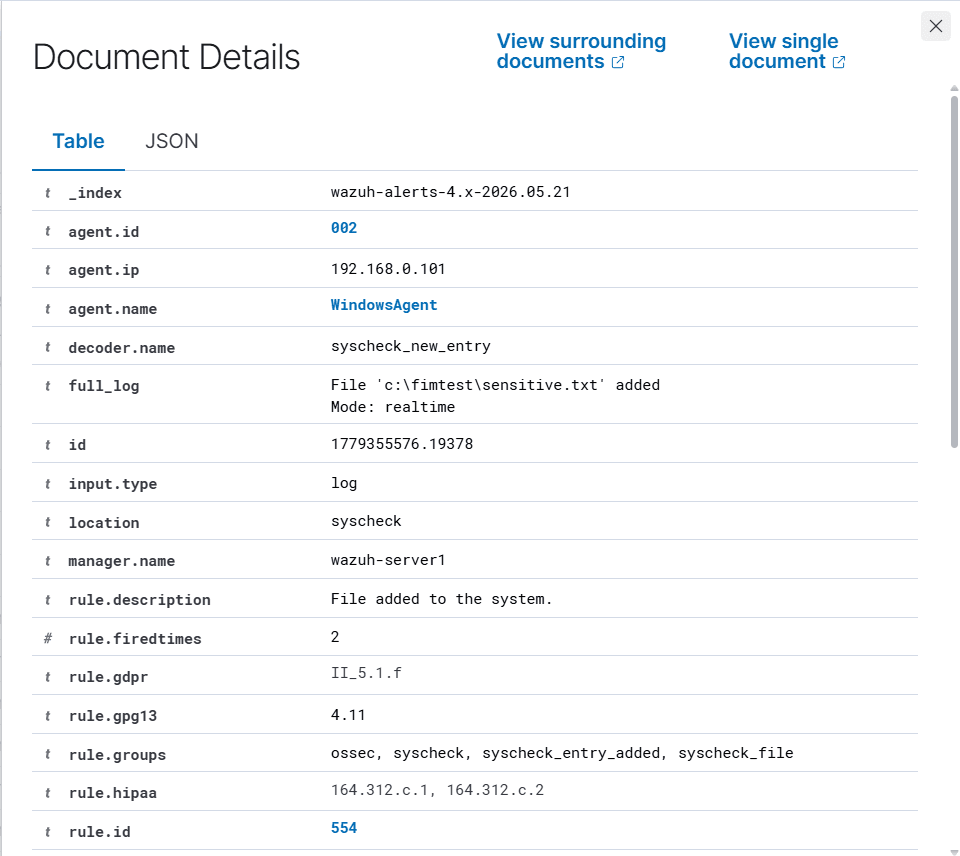 Windows agent — file addition alert in the Wazuh dashboard
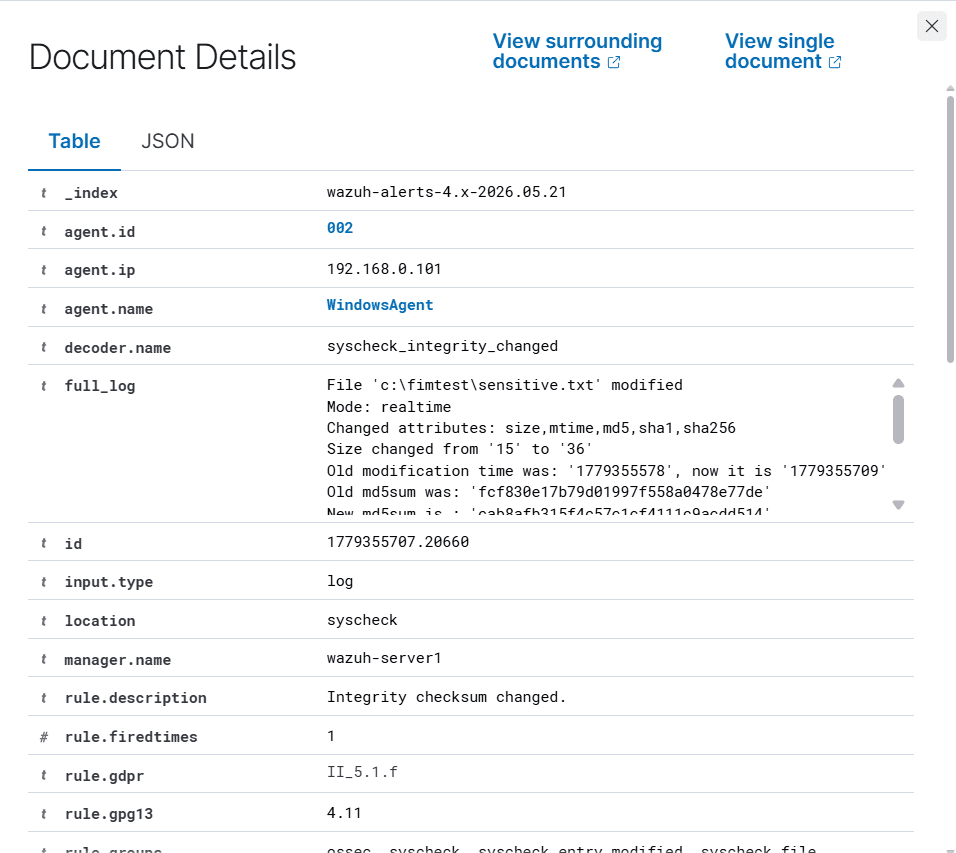 Windows agent — file modification alert in the Wazuh dashboard
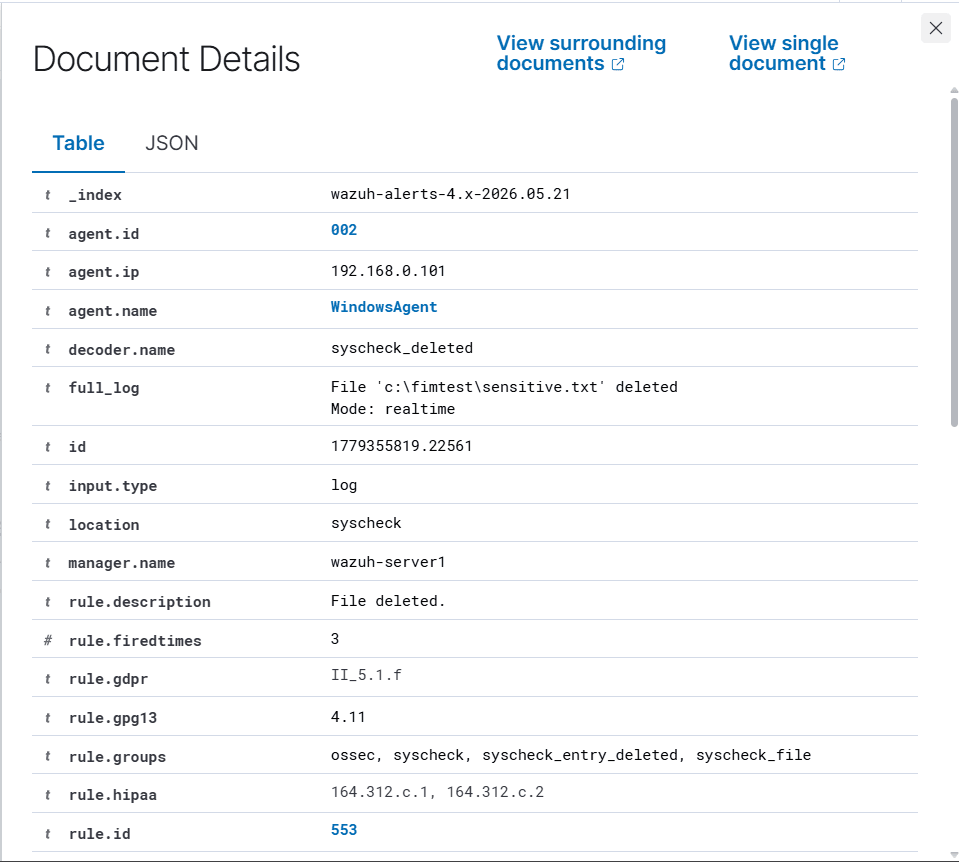 Windows agent — file deletion alert in the Wazuh dashboard
Linux — File Operations
Creating a file:
sudo touch /fim_test/sensitive.txt
echo "Initial content" | sudo tee /fim_test/sensitive.txt
Modifying the file:
echo "Modified line added" | sudo tee -a /fim_test/sensitive.txt
Deleting the file:
sudo rm /fim_test/sensitive.txt
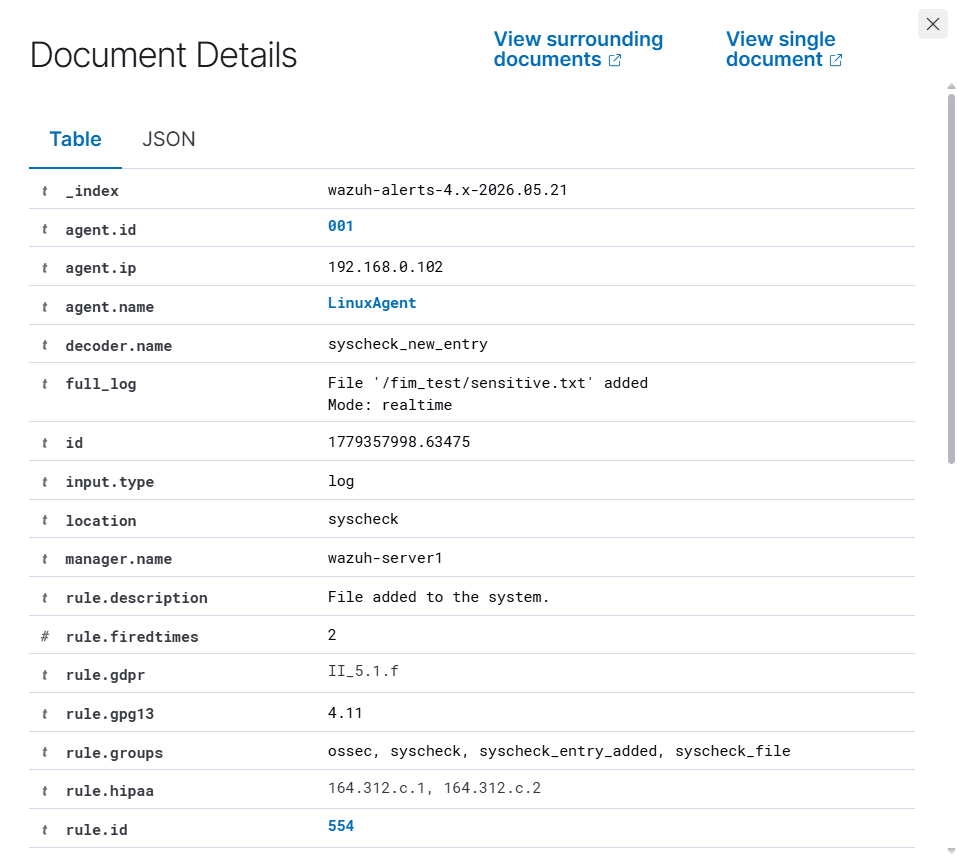 Linux agent — file addition alert in the Wazuh dashboard
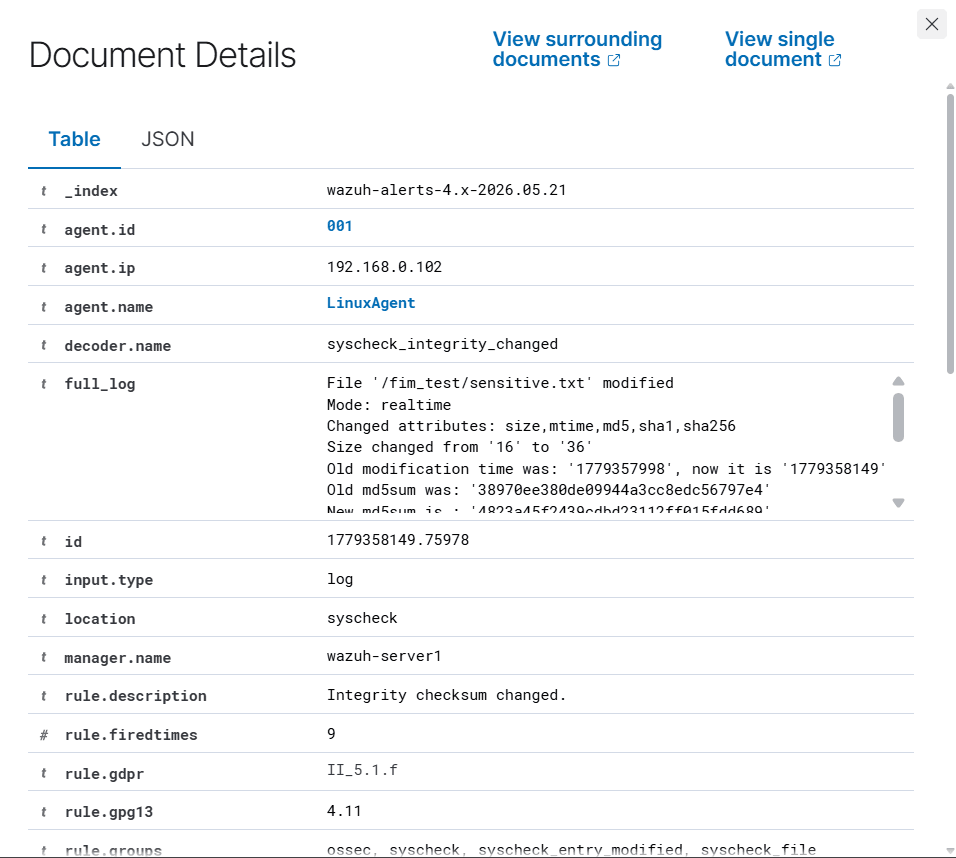 Linux agent — file modification alert in the Wazuh dashboard
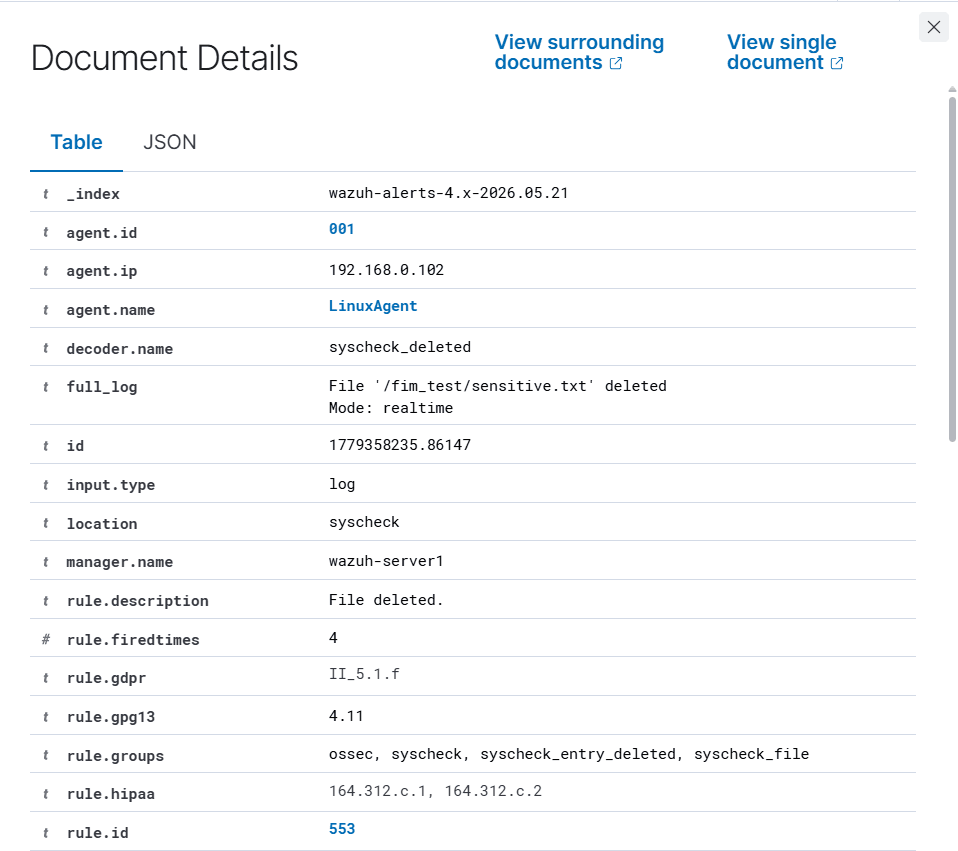 Linux agent — file deletion alert in the Wazuh dashboard
Dashboard Observations
Alerts were visible in the Wazuh dashboard under Modules → Integrity Monitoring within seconds of each operation, confirming that real-time monitoring was functioning on both agents.
Each alert included the file path, the attributes that changed, the agent name, and — because report_changes="yes" was set — a diff showing the exact content that was added to the file during the modification event. This demonstrated the practical value of report_changes for text-based files: knowing that a line reading "Modified line added" appeared in a config file is significantly more actionable than knowing only that the file hash changed.
A notable observation was that both agents, despite running different operating systems, produced alerts in the same normalized format within the Wazuh dashboard. This is one of the core strengths of a SIEM — cross-platform telemetry is standardized so analysts work from a consistent view regardless of the underlying endpoint.
Part 3 — Applying a SOC-Aligned Monitoring Strategy
The test configuration above confirmed that FIM works as expected. The next step was to redesign the monitored directories to reflect how FIM would realistically be configured in a production SOC environment.
The guiding principle is that not all directories warrant the same level of scrutiny. Applying real-time monitoring and full attribute checks everywhere would generate excessive alert volume and contribute to analyst fatigue — a well-documented problem in SOC operations. Instead, directories are tiered based on their sensitivity and how frequently they change during normal operations.
Three tiers were identified:
- Tier 1 — Highest sensitivity. Changes are rare under normal conditions and almost always indicate malicious activity or unauthorized access. Real-time monitoring and content diffing are justified.
- Tier 2 — High sensitivity. Changes warrant immediate alerting but content diffing adds limited value, either because files are binary or because the presence of a new file is itself the significant indicator.
- Tier 3 — Baseline coverage. Directories that change during normal operations such as software updates. Scheduled scanning is sufficient to detect drift without generating continuous noise.
Windows Configuration
<!-- ==================== TIER 1 ==================== -->

<!-- System32 — attackers replace or plant binaries here for persistence and masquerading -->
<directories realtime="yes" report_changes="yes" check_all="yes">%WINDIR%\System32</directories>

<!-- Hosts file — commonly tampered to redirect DNS resolution -->
<directories realtime="yes" report_changes="yes" check_all="yes">%WINDIR%\System32\drivers\etc</directories>

<!-- Startup folders — primary persistence location on Windows -->
<directories realtime="yes" report_changes="yes" check_all="yes">%APPDATA%\Microsoft\Windows\Start Menu\Programs\Startup</directories>
<directories realtime="yes" report_changes="yes" check_all="yes">%PROGRAMDATA%\Microsoft\Windows\Start Menu\Programs\Startup</directories>

<!-- Scheduled tasks — heavily used for persistence by attackers -->
<directories realtime="yes" report_changes="yes" check_all="yes">%WINDIR%\System32\Tasks</directories>

<!-- SAM and security hive — tampering here indicates credential access activity -->
<directories realtime="yes" report_changes="yes" check_all="yes">%WINDIR%\System32\config</directories>


<!-- ==================== TIER 2 ==================== -->

<!-- Web root — detect webshells being dropped -->
<directories realtime="yes" check_all="yes" recursion_level="3">C:\inetpub\wwwroot</directories>

<!-- PowerShell directories — execution environment for many attack chains -->
<directories realtime="yes" check_all="yes">%WINDIR%\System32\WindowsPowerShell\v1.0</directories>

<!-- Wazuh agent directory — detect tampering with the monitoring agent itself -->
<directories realtime="yes" check_all="yes">C:\Program Files (x86)\ossec-agent</directories>


<!-- ==================== TIER 3 ==================== -->

<!-- NOTE:
Tier 3 monitoring for Program Files and user directories was initially tested
but later removed from the Windows host. The volume of files and frequency of
changes caused prolonged scans and noticeably degraded FIM responsiveness on
the lab host. In a production environment these paths would normally be monitored
through carefully tuned exclusions, recursion limits, or scheduled scans on
higher-specification systems.
-->

<!-- Program Files — changes expected during software updates -->
<!-- Removed after testing due to excessive scan overhead -->
<!-- <directories check_all="yes">C:\Program Files</directories> -->
<!-- <directories check_all="yes">C:\Program Files (x86)</directories> -->

<!-- User home directories — useful for insider threat and DLP use cases -->
<!-- Removed after testing due to excessive scan overhead -->
<!-- <directories check_sums="yes" check_size="yes">C:\Users</directories> -->
Linux Configuration
<!-- ==================== TIER 1 ==================== -->

<!-- Core system binaries — replacing these is a classic rootkit and masquerading technique -->
<directories realtime="yes" report_changes="yes" check_all="yes">/bin</directories>
<directories realtime="yes" report_changes="yes" check_all="yes">/sbin</directories>
<directories realtime="yes" report_changes="yes" check_all="yes">/usr/bin</directories>
<directories realtime="yes" report_changes="yes" check_all="yes">/usr/sbin</directories>

<!-- PAM configuration — modifying PAM can allow authentication bypass on any account -->
<directories realtime="yes" report_changes="yes" check_all="yes">/etc/pam.d</directories>

<!-- SSH configuration and authorized_keys — used to plant persistent backdoors -->
<directories realtime="yes" report_changes="yes" check_all="yes">/etc/ssh</directories>

<!-- sudoers — a modified sudoers file is one of the fastest paths to privilege escalation -->
<directories realtime="yes" report_changes="yes" check_all="yes">/etc/sudoers.d</directories>

<!-- Cron directories — one of the most common persistence mechanisms on Linux -->
<directories realtime="yes" report_changes="yes" check_all="yes">/etc/cron.d</directories>
<directories realtime="yes" report_changes="yes" check_all="yes">/etc/cron.daily</directories>
<directories realtime="yes" report_changes="yes" check_all="yes">/var/spool/cron</directories>


<!-- ==================== TIER 2 ==================== -->

<!-- Web root — detect webshells being written to the server -->
<directories realtime="yes" check_all="yes" recursion_level="5">/var/www/html</directories>

<!-- Shared libraries — library hijacking allows code execution via legitimate binaries -->
<directories realtime="yes" check_all="yes">/lib</directories>
<directories realtime="yes" check_all="yes">/lib64</directories>
<directories realtime="yes" check_all="yes">/usr/lib</directories>

<!-- Systemd units — the primary persistence mechanism on modern Linux systems -->
<directories realtime="yes" check_all="yes">/etc/systemd/system</directories>
<directories realtime="yes" check_all="yes">/lib/systemd/system</directories>

<!-- Boot directory — detect bootkit or bootloader tampering -->
<directories realtime="yes" check_all="yes">/boot</directories>

<!-- Wazuh agent directory — detect tampering with the monitoring agent itself -->
<directories realtime="yes" check_all="yes">/var/ossec</directories>


<!-- ==================== TIER 3 ==================== -->

<!-- General etc — broad configuration baseline, changes expected during package updates -->
<directories check_all="yes">/etc</directories>

<!-- Home and root directories — light monitoring for dropped tools and shell history changes -->
<directories check_sums="yes" check_size="yes">/home</directories>
<directories check_sums="yes" check_size="yes">/root</directories>
Reasoning Summary
Several decisions in this configuration are worth highlighting explicitly.
Monitoring the agent itself — Both the Windows and Linux configurations include the Wazuh agent directory as a Tier 2 monitored path. An attacker who has gained access to a system may attempt to disable or modify the monitoring agent to remove visibility before proceeding. Alerting on changes to the agent's own files means that defense evasion attempts are themselves detected.
report_changes is omitted from binary directories — For directories like /lib, /lib64, and %WINDIR%\System32, the files are binary executables and shared libraries. A diff of a binary file produces output that is not human-readable and adds no analytical value. The alert itself — that a hash changed on a system binary — is sufficient. report_changes is reserved for text-based files such as configuration files, scripts, and startup items where the changed content is directly interpretable.
Tier 3 directories use check_sums rather than check_all — For high-volume directories like /etc, /home, and C:\Users, running full attribute checks on every file during a scheduled scan is resource-intensive. Using check_sums focuses monitoring on the most important indicator — whether the file content changed — without the overhead of checking every metadata attribute on thousands of files.
Change management context — In a production SOC, this configuration would be paired with a change management process. During a scheduled patching window, analysts acknowledge expected FIM alerts in bulk so they do not mask genuine detections. Without this process, patch Tuesday on a Windows environment would generate hundreds of System32 alerts and significantly degrade signal quality. The tiered approach helps by keeping Tier 3 alerts on a scheduled cadence that aligns more naturally with maintenance windows.
Operational limitation discovered during testing — Tier 3 monitoring on the Windows lab host was ultimately removed after testing revealed that scanning large, high-churn directories such as C:\Program Files, C:\Program Files (x86), and C:\Users significantly impacted FIM performance. The Windows host used in the lab had limited resources, and the volume of filesystem activity caused scans to become excessively heavy, delaying or interfering with real-time monitoring behaviour. This highlighted an important operational reality: broad FIM coverage must be balanced against endpoint performance. In production environments, these directories are typically monitored using tighter recursion limits, exclusion rules, scheduled scans, or more capable hardware.
Lessons Learned
- Real-time monitoring is essential for the highest-sensitivity paths but should be applied selectively. Blanket real-time monitoring across all directories generates alert volumes that are operationally unmanageable.
- The
report_changesattribute provides significant triage value for text-based files. Seeing the exact line added to/etc/ssh/sshd_configor a Windows startup script is more actionable than a hash change alone. - Normalizing FIM events from different operating systems into the same dashboard view demonstrates the core value of a SIEM — platform differences become invisible to the analyst.
- Monitoring the monitoring agent is a non-obvious but important configuration. Defense evasion through agent tampering is a realistic attacker behaviour that FIM can detect.
- Large high-churn directories on Windows such as
C:\Program FilesandC:\Userscan negatively impact FIM responsiveness on lower-specification hosts. Broad coverage needs careful tuning through exclusions, recursion limits, or scheduled scans to avoid degrading real-time monitoring performance. - FIM configuration is not a one-time task. As new services are deployed to an endpoint, the monitored directory list should be reviewed and updated to include their configuration paths.
Conclusion
This lab demonstrated the configuration and operational use of Wazuh's File Integrity Monitoring module across both Windows and Linux endpoints. Starting from the default syscheck configuration, custom directories were added and tested to confirm that creation, modification, and deletion events produce timely and detailed alerts in the dashboard.
The configuration was then extended to reflect a tiered monitoring strategy aligned with real SOC practices — prioritising immediate alerting on the paths most frequently targeted by attackers, while applying lighter scheduled monitoring to directories that change during normal operations.
During testing, an operational limitation was identified on the Windows lab VM where broad Tier 3 monitoring introduced enough filesystem overhead to interfere with efficient FIM operation. As a result, the Tier 3 Windows paths were removed, reinforcing the importance of balancing visibility with endpoint performance when designing FIM policies.
The next lab in this series covers brute force and credential stuffing detection, extending the monitoring scope from filesystem changes to authentication events — observing how Wazuh surfaces repeated failed login attempts and maps them to relevant MITRE ATT&CK techniques.